Navionics

Status
Not open for further replies.
Probably need to verify which does what. My Humminbird 859 di HD does the lake level adjustments and the Lakemaster Western states ver.1.0 works great at Powell. That alone has saved my bacon numerous times. Worth EVERY penny. Sq
Do you know if the lakemaster western states works well in the upper reaches of the San Juan Arm.(Paiute Canyon)?
 
I am sorry I can't answer your question. I have only been up as far as Cha Canyon twice. I am sure someone will answer your question. Sq
 
birdsnest,
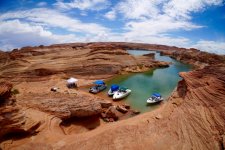
The photo I posted of our cruiser parked near the mouth of Piaute Cyn. was taken on 5-16-2014 when the water level was at 3582'. 30 or so feet lower than now. Should be several places farther in to tie up as well. Hope this helps!

GregC
 
birdsnest,
The photo I posted of our cruiser parked near the mouth of Piaute Cyn. was taken on 5-16-2014 when the water level was at 3582'. 30 or so feet lower than now. Should be several places farther in to tie up as well. Hope this helps!

GregC
Thanx. We are absolutely going there and that site looked great, I am trying to get some info on the Lakemaster card for the upper San Juan.
 
View attachment 1711 I love this site.

8 months ago I came to Lake Powell the first time with our own boat, posted a number of questions on this forum, and based on feedback from many smart people over that period I've learned a lot of lessons without having to learn them the hard way!

Now, here I am less than a year later able to contribute and pass on my own lessons learned.

It's an amazing way to share ideas, pass on knowledge, and make the lake a better (safer) place for all.
One downside I could think of for using the app verses your chart plotter is not having the ability to set waypoints when you pass over a bunch of fish etc..... I use that feature alot when searching for fish. Cruising at 5 or 6mph see a bunch of fish on the graph and quickly pop a waypoint then have the ability to stop the boat, turn around and drive right back to them.... Not sure if you'd be able to do that with the app ?
 
One downside I could think of for using the app verses your chart plotter is not having the ability to set waypoints when you pass over a bunch of fish etc..... I use that feature alot when searching for fish. Cruising at 5 or 6mph see a bunch of fish on the graph and quickly pop a waypoint then have the ability to stop the boat, turn around and drive right back to them.... Not sure if you'd be able to do that with the app ?

Assuming your Fishfinder finds the fish, if you have the Navionics map running at the same time on your phone or iPad you definitely can set waypoints with the app!👍🏼
 
Last edited:
And so much more... it records your entire trip and even lets you save and play them back like a DVR by driving the pin around the map properly representing the speed and everything. It’s amazing.
 
Interesting. Sounds like might be an option for people that already have a tablet and don't have a finder.

If you don’t have a fish finder but need a good Nav app, Navionics for iPhone, iPad, or Android does everything a graph can do and more.

Look upward in this thread to find the longer response I gave providing all the details and web links.
 
I have the navonics app on both my I phone and I pad. The location icon on the I phone seems to be pretty accurate, not so much with the I pad. At times I've noticed it's off by a lot, like 100-200 yards so I've always been leery of using it for way points.
 
I have the navonics app on both my I phone and I pad. The location icon on the I phone seems to be pretty accurate, not so much with the I pad. At times I've noticed it's off by a lot, like 100-200 yards so I've always been leery of using it for way points.

The app works VERY well if you pair your iPad or iPhone with an external GPS device like the Garmin GLO. It uses GLONAS to update your position 10 times a second, is accurate to within a foot, and has no lag. It then connects to your iPad/iphone (or Android) using Bluetooth.

The Garmin GLO isn't waterproof, but can tollerate heat so I suction mount mine under the windshield where it has line of site for sky, no metal objects around to affect the compass, and is protected from rain. It's got a built in battery that lasts about 2 days on a charge (and has a USB port for charging, and it will operate while charging if you run a cable to it in the boat from a cigarette outlet, etc.)

The GLO is $100, but more than worth it because you can use it for more than your boat (works in a car or even an airplane too!).

It's especially perfect if:

1. You don't have a Fishfinder capable of using external Navionic's micro-SD cards
2. You do have a Fishfinder, but want something portable that you can use regardless of what boat or car you're in
3. You need a way to share your planned, present, or past location with friends/family (to show your spot, meet point, etc.) Using the App it's easy to set a point and take a screen shot, which a savvy user can then use to pinpoint your location on their mapping device. If the other person has the app too you can easily record, and share your location, your waypoints, your entire trip track including speed, direction, etc (like a DVR recording). It will send to the other user through their system online (requires internet or cellular to work obviously).

With the external GPS device paired (GLO) the iPhone app is perfectly accurate.

It should be stated too, that the Garmin GLO using Bluetooth can be paired to as many as 5 or 6 devices at the same time... meaning both iPhone and iPad can be connected, and anyone else in your boat that has GOOGLE MAPS (pre-downloaded... yes you can pre-download entire regions).

If you (or they) download the Google maps for your region ahead of time, then when you get mobile on the lake and lose service from cell, it has the data onboard the phone to map you. All it needs then is the GPS coordinates. The phone has a GPS anntenae built in, but as you saw yourself, they're often unreliable due to interference, etc.

Using the external GPS unit paired with bluetooth, plus Google Maps pre-downloaded (or Navionics & any number of mapping apps) provides a pretty damned accurate way of navigating and knowing exactly where you are with just a GPS signal (no phone service needed).
 
I have successfully uploaded lakemaster card in my humminbird 788ci and tried it out at Mead yesterday and besides my usual handicaps as a non computer guy I got it to work and like it...except. When I went to lake level adjust the most I could adjust it was 30'. Went to a youtube site and saw 200' adjustment on the youtube guys screen but mine has 30' on the screen. Does anyone know how to change the parameters of lake level adjust so it will get into the 100' range to work at Powell?
 
Buoy 15 cove on the south side of the main channel is another secret spot.

We checked that out March 31st Wayne.

It’s a beautiful cove, with crystal clear water and large fish visibly swimming away in 30’ of water.

I suspect if we hadn’t driven the boat up in we could have kept our distance and cast a crank or spoon and caught a few.
 
Interesting. Sounds like might be an option for people that already have a tablet and don't have a finder.
The thing with GPS sonar combo is I can scroll back to mark with fish hit touch screen on fish and instant waypoint set on those fish, very powerful feature. Other thing is with combo you can create maps real time, 1 foot contours, very useful feature.
 
I have successfully uploaded lakemaster card in my humminbird 788ci and tried it out at Mead yesterday and besides my usual handicaps as a non computer guy I got it to work and like it...except. When I went to lake level adjust the most I could adjust it was 30'. Went to a youtube site and saw 200' adjustment on the youtube guys screen but mine has 30' on the screen. Does anyone know how to change the parameters of lake level adjust so it will get into the 100' range to work at Powell?
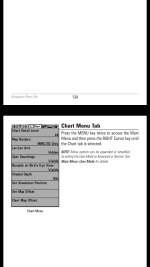
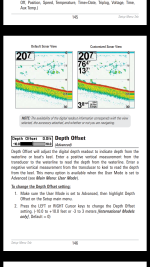
There's several things that can be adjusted when in your menu are you setting the map offset? Screenshot_2018-04-07-12-39-03.pngor are you setting the depth offset? Screenshot_2018-04-07-12-38-28.png
 
There's several things that can be adjusted when in your menu are you setting the map offset? View attachment 1943or are you setting the depth offset? View attachment 1944
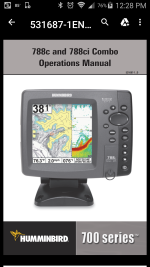
The map offset should give you what you are looking for, should be able to minus however many ft below full pool, like -88 ft should get you real close at Powell today. Keep in mind that the map offset is what you set it at no matter lake you are on, it needs to be adjusted based on the lake and it's current level when you are there. If you go to hummingbirds website and click on support you can download the owners manual for that unit Screenshot_2018-04-07-12-28-27.pnghope that helps
 
Status
Not open for further replies.
Back
Top