Steve Moore
Well-Known Member
I like my Lake Master card in my Hummingbird. Set the lake level and zoom in with the GPS and you can be on the look out for them critters before they sneak up on ya. Also enjoy seeing the main channel on it


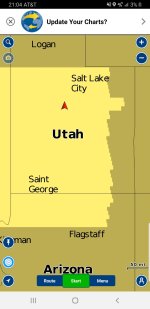
Cliff, to set the lake water level in the Navionics app I first look it up in the Lake Powell Water Database, 3609' today. Then I go into Menu in the Navionics app and select Map Options. Under Map Options make sure that Water Level Correction is turned on. Next, since the app defaults to 3600' for Lake Powell I set the Water Level slider to +9'. You can also fiddle with the sliders for Shallow Area, Depth Shading and Depth Contours to get the map looking the way you want.
With the pics below you can see what one area of Padre Bay looks like set to a water level of +9/3609 (be careful, but usable) and what it looks like at -10/3590 (totally unusable). With the sliders you can define what level of safety you want indicated on your map, e.g., "warn me away from areas less than 10' deep", or "warn me of those less than 50'.
The app also has a Route feature, shown on the third pic, with Automatic, Manual, or Previous Route options. I haven't used this feature, but I believe that in Automatic you set your start point (e.g. AP Marina) and your end point (e.g., favorite spot in Last Chance) and it shows the fastest safe route. So, on your phone/pad you just follow the route it sets, or on your Raymarine/Garmen it appears to be self driving (probably good for the open ocean but not for Lake Powell). Again, I've haven't used this feature, only read snippets about it.
View attachment 8678View attachment 8679View attachment 8680
That idea doesn't work at Powell because of spires,buttes and other odd formations native to this lake. West Canyon is one of the best examples of rocks being where they are not supposed to be. Attention to yellow water and a good water level adjust sonar or app are essential to safe navigation at Powell. I know what you are saying and virtually all the rivers in the east and south abide by your scenario. The channel at Powell is wherever it wants to be and even then whales can be lurking very close to the edge of the channel or even in the channel. Ten years working on the lake and a few props back me up. (ain't proud about the props but I had a weird job that exposed me fairly often). No dirty minds allowed!
I agree with Birdsnest on this. West canyon is a great example of this.That idea doesn't work at Powell because of spires,buttes and other odd formations native to this lake. West Canyon is one of the best examples of rocks being where they are not supposed to be. Attention to yellow water and a good water level adjust sonar or app are essential to safe navigation at Powell. I know what you are saying and virtually all the rivers in the east and south abide by your scenario. The channel at Powell is wherever it wants to be and even then whales can be lurking very close to the edge of the channel or even in the channel. Ten years working on the lake and a few props back me up. (ain't proud about the props but I had a weird job that exposed me fairly often). No dirty minds allowed!

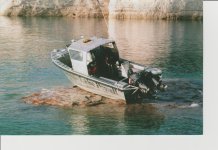
Ouchitshappens. Wasn't me driving. Took out both lowers and cracked hull. I'm in the upper pilot station of our salvage vessel taking the picture.

I also didn't see on the app where it identified the base level for Lake Powell so I called Navionics, and also computed it myself using the depth finder on my boat.ScottF This is a really helpful explanation. I have wondered how to use this water adjustment feature but never knew that the baseline was 3600 feet. Just out of curiosity, where can I see the default lake level in case I forget?
Agree, I require that any of my kids who drive my cruiser or sport boat use the Navionics app.I highly recommend the Navionics app on your phone. I have a suction cup phone holder that allows the phone to be right in front of me and plugged into a 12v charger. As noted prior, adjust the app to current lake level and it is amazingly helpful and accurate. I just spent the last 6 days on the lake using it and now won’t enter an unfamiliar area without it.
I have forward looking sonar on my cruiser that looks ahead about 125' and alarms on anything within 10' of the surface. This is useful as long as you are traveling at a speed that would allow you to stop in less than 125'. Not sure what that speed would be on a houseboat?There is/was a sonar that was installed on several of the HBs I drove that looked forward to show up coming shallow areas.
You could see the shelf out in front of you as it approached.
ScottF, I'm not trying to turn you into Navionic customer support, but you really are dishing great info so I'm going to ask another question.I also didn't see on the app where it identified the base level for Lake Powell so I called Navionics, and also computed it myself using the depth finder on my boat.
But more to your question, if you've forgotten that the base lake level is 3600' or if you forgot to look up the current level of the lake and now you're out of cell phone coverage, just... Check the depth finder on your boat (says I'm in 10' of water), then move the slider on the app until it shows you are in 10' of water. Easy peasey.
 One of the things that bugs me about Navionics is that the canyon names and bays are hard to figure out. I find myself wishing there was a Stan Jones map layer or something! Anyway, I really do find it a pain to zoom in and out to find the names and to hover over buoys and even then, I can't find the names most of the time. For example, I haven't ever been able to find "Cookie Jar" on any of the maps. Do you have any thoughts on this? Are feature names not in the apps' wheelhouse?
ScottF, I'm not trying to turn you into Navionic customer support, but you really are dishing great info so I'm going to ask another question.

Just remember that even with the App its not fool proof and the best thing to remember while boating on Powell is-I just downloaded the Navionics App. Beyond COOL. I'm planning my first ever trip next week to Lake Powell and was bothered by the whales and just not knowing the waters. This app has made those concerns go away.
Saved me at least $600.00 on a new fish finder/plotter etc.

Polarized sunglasses are a HUGE benefit as well not only for seeing whales while cruising but for watching fish take your lure in 15ft of water under the boat. Powell is amazing.My boat cruises about 25 to 28. It's not a rocket but I'll keep my eyes wide open.
Quick question. I downloaded and saved 2 maps of the lake for offline use but I can't find them in the app. How do i access the saved maps? I'm assuming I'll have no cell service on most of the lake.
I'm with T-Mobile and have a droid

My boat cruises about 25 to 28. It's not a rocket but I'll keep my eyes wide open.
Quick question. I downloaded and saved 2 maps of the lake for offline use but I can't find them in the app. How do i access the saved maps? I'm assuming I'll have no cell service on most of the lake.
I'm with T-Mobile and have a droid
This is exactly how I set my colors as well really like having the red zone and green zone for caution and fishing to look at a quick glance while running on plane.I have a lake master chip on my Hummingbird fish finder. Base lake level on mine is 3700. So at this water level (3606) I would adjust it to -94 feet to obtain the proper readings. Water less than 10' is red on the map and less than 20' is green. I won't run down the lake with out it on.