Free Live Depth Map of the Lake: LakeStats Compass

dallinw32

Member
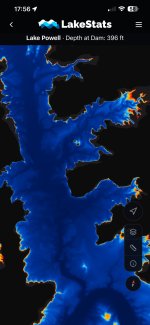
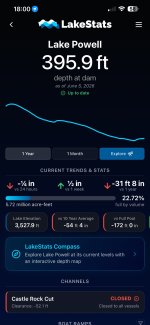
Hey everyone! I've been working on a website and iOS app called LakeStats for a while now that has a bunch of the data about the water level, both current and historical. Recently however I've been building out what I call LakeStats Compass, which is a live depth map of the lake that adjusts to the current actual lake level.

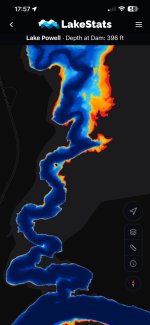
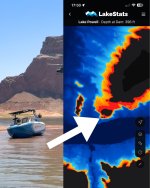
It uses a USGS survey of the lake, and USBR daily lake level readings to show you the shape of the lake, and the depth of it on a map. Red is dangerous (less than 5ft deep), yellow is shallow (5-20ft deep) and blue is deep.

It is currently still in testing, but my family and others have been using it for the last few weeks and it's reliable enough to release to the fine Lake Powell enthusiasts on Wayne's Words. It's completely free and I'd love to get feedback from as many people as possible about what works well and what doesn't before I release it officially.

Here is the link to download the beta version (through Apple's testing service, Testflight): https://testflight.apple.com/join/g2JzeVH3
No android version yet, but if enough people show interest for one I can work on that

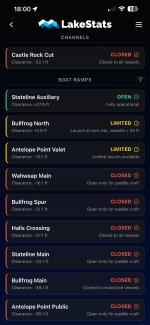
Attached are some screenshots of what it looks like now, including a screenshot of what the map shows for that rock where that boat was found everyone was talking about this week (my family drove by and saw it). I also included screenshots of the main LakeStats pages

Please let me know what you think! Good or bad! You can dm me, leave your feedback here, or theres a feedback page on the app itself. I love Lake Powell and I want to make this as useful to my fellow Powell fans as I can. Happy to make changes or consider new features.
 

Attachments

  • LakeStats Compass Comparison.jpg
    LakeStats Compass Comparison.jpg
    244.5 KB · Views: 49
  • LakeStats Compass.jpg
    LakeStats Compass.jpg
    237.6 KB · Views: 51
  • LakeStats Compass Wahweap Channel.jpg
    LakeStats Compass Wahweap Channel.jpg
    198.3 KB · Views: 42
  • LakeStats Dashboard.jpg
    LakeStats Dashboard.jpg
    245 KB · Views: 41
  • LakeStats Access Points.jpg
    LakeStats Access Points.jpg
    276 KB · Views: 48
I just added it to my phone! I get to the lake on Tuesday and I am looking forward to testing it out. Thanks for sharing
Thanks for checking it out! I'm excited to hear what you think. Let me know what features would be helpful to you or if anything doesn't work as expected.

What is the date of the USGS survey that you are using?
The survey is dated 2021 from the USGS, and uses data collected in 2017-2018 and 2020.
 
This is terrific. Does it show my location on the map as I travel? What are the specs? Can I zoom in? Etc. give me all the details
Here are all the details as it currently stands:

Yes, it shows your location on the map, and you can have it follow you as you drive around, just like on Google Maps.

Yes you can zoom in, and the map itself at full resolution (which you can and should download for offline use) is about 1 meter per pixel, which is the highest resolution data for Lake Powell available. If you don't want it taking close to a gigabyte of storage on your phone, you can download a much smaller version which comes shows about 4 meters per pixel.

When you're at the lake, it will show what the estimated depth is at your location, and a speedometer too. (Houseboats these days don't have depth gauges or speedometers, so I like using it especially when driving the houseboat).

It currently is completely free for anyone to use. I'm still trying to figure out how I'm going to cover the costs of running it, but I want to make this as accessible as I can for everyone.

Everyday LakeStats asks the government for the current lake level, and updates the map on your phone without you having to redownload the map. It just figures it out locally. You can also change the lake level just to see what the lake looks like at different levels.

Right now the depth data is colored so that water 5ft and shallower is red, 5-20ft deep is yellow, and 20+ is blue, but I'm planning on making it so there are other options of coloring that fit other people's needs (let me know what y'all want)

I'm planning on publicly releasing it in the next week or two, there are just several things I want to polish up, and I'm hoping the Waynes Words community has some good feedback for me to implement.

Let me know if you have any other questions!
 
Here are all the details as it currently stands:

Yes, it shows your location on the map, and you can have it follow you as you drive around, just like on Google Maps.

Yes you can zoom in, and the map itself at full resolution (which you can and should download for offline use) is about 1 meter per pixel, which is the highest resolution data for Lake Powell available. If you don't want it taking close to a gigabyte of storage on your phone, you can download a much smaller version which comes shows about 4 meters per pixel.

When you're at the lake, it will show what the estimated depth is at your location, and a speedometer too. (Houseboats these days don't have depth gauges or speedometers, so I like using it especially when driving the houseboat).

It currently is completely free for anyone to use. I'm still trying to figure out how I'm going to cover the costs of running it, but I want to make this as accessible as I can for everyone.

Everyday LakeStats asks the government for the current lake level, and updates the map on your phone without you having to redownload the map. It just figures it out locally. You can also change the lake level just to see what the lake looks like at different levels.

Right now the depth data is colored so that water 5ft and shallower is red, 5-20ft deep is yellow, and 20+ is blue, but I'm planning on making it so there are other options of coloring that fit other people's needs (let me know what y'all want)

I'm planning on publicly releasing it in the next week or two, there are just several things I want to polish up, and I'm hoping the Waynes Words community has some good feedback for me to implement.

Let me know if you have any other questions!
I love it. Thank you for making something like this! I am a guy that is almost always on OnX Hunt maps for hunting adventures. Like most I’m using navionics at the lake a lot, to the tune of $100 per year or whatever it is. It’s just not as accurate as I’d like it to me and sadly, that means the hazards as well, sometimes!

I like having maps in my hand and I certainly like staying away from any hazards while at the lake and being “in charge” of everyone’s safety while boating!
 
Back
Top