Bullfrog quick update gushing mudline more

Status
Not open for further replies.
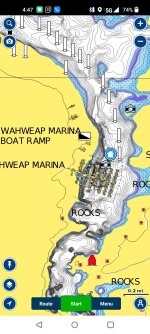
Yep screenshot from phone navionics. It’s not an exact science as that shelf ran from about 12 feet to 26 feet at that time with different humps and stuff not shown on the map. So don’t just pull up trusting it 100%. Even on better mapped lakes I’ve pulled up on “12 foot ledges” and they’ve been sand bars sticking out of the water. So use some discretion when pulling up on these shallow flats.
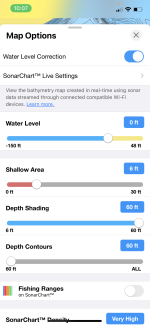
Just downloaded Navionics on my iPhone. Was playing around with it, specifically at the Fishing Ranges and Water Level settings. It appears there is no way to plug in a current elevation number (3524). Instead you have to do some math to come up with a specific number of feet lower or higher than 0.
My question is, what lake level at Lake Powell on Navionics is considered 0 (the elevation starting point to measure from). If it’s full pool of 3700 then the slider allows one to adjust downward by 150 feet but we are currently 175’ish feet lower than full pool of 3700.
I actually called Navionics and they were unable to give me a direct answer about this dilemma. They told me that each lakes elevation is based off of full pool Elevation.

Any advice on this from anyone would be very helpful. I know this thing is not 100% accurate but I would hope I could get it closer than the 25 foot offset I think I have if 0 is based on 3700MSL elevation with a lake level of 3525msl.
 
Just downloaded Navionics on my iPhone. Was playing around with it, specifically at the Fishing Ranges and Water Level settings. It appears there is no way to plug in a current elevation number (3524). Instead you have to do some math to come up with a specific number of feet lower or higher than 0.
My question is, what lane level at Lake Powell on Navionics is considered 0 (the elevation starting point to measure from). If it’s full pool of 3700 then the slider on allows one to adjust downward by 150 feet but we are currently 175’ish feet lower than full pool of 3700.
I actually called Navionics and they were unable to give me a direct answer about this dilemma. They told me that each lakes elevation is based off of full pool Elevation.

Any advice on this from anyone would be very helpful. I know this thing is not 100% accurate but I would hope I could get it closer than the 25 foot offset I think I have if 0 is based on 3700MSL elevation with a lake level of 3525msl.
 

Attachments

  • IMG_1206.png
    IMG_1206.png
    257.4 KB · Views: 10
Just downloaded Navionics on my iPhone. Was playing around with it, specifically at the Fishing Ranges and Water Level settings. It appears there is no way to plug in a current elevation number (3524). Instead you have to do some math to come up with a specific number of feet lower or higher than 0.
My question is, what lake level at Lake Powell on Navionics is considered 0 (the elevation starting point to measure from). If it’s full pool of 3700 then the slider allows one to adjust downward by 150 feet but we are currently 175’ish feet lower than full pool of 3700.
I actually called Navionics and they were unable to give me a direct answer about this dilemma. They told me that each lakes elevation is based off of full pool Elevation.

Any advice on this from anyone would be very helpful. I know this thing is not 100% accurate but I would hope I could get it closer than the 25 foot offset I think I have if 0 is based on 3700MSL elevation with a lake level of 3525msl.
Someone posted yesterday on a thread I started asking about mapping programs. They said that Navionics has full pool of 3606 (which is WAY off from real full pool). So I have mine set at -83 right now. I also downloaded the navionics app yesterday and have been playing around with yesterday and today. Super cool features. I bought a suction cup mount for the Ipad and plan on using is this weekend. I will let you know how it goes.
 
Someone posted yesterday on a thread I started asking about mapping programs. They said that Navionics has full pool of 3606 (which is WAY off from real full pool). So I have mine set at -83 right now. I also downloaded the navionics app yesterday and have been playing around with yesterday and today. Super cool features. I bought a suction cup mount for the Ipad and plan on using is this weekend. I will let you know how it goes.
Thank you Bigcatpt. I remember that now that you mentioned it. Whoever posted that “Full Pool” elevation I would love to know where you got that info? Is there a database somewhere that has lake elevations used. Just curious for use at other lakes.

Bigcatpt. I’m super excited to hear how it works for you. Can’t wait to hear your report!

Thank you all
 
Thank you Bigcatpt. I remember that now that you mentioned it. Whoever posted that “Full Pool” elevation I would love to know where you got that info? Is there a database somewhere that has lake elevations used. Just curious for use at other lakes.

Bigcatpt. I’m super excited to hear how it works for you. Can’t wait to hear your report!

Thank you all
I hope to have a great fishing report as well as an update on using the Navionics app. I think it could be a game changer especially with the stained/muddy water I expect to encounter.

I bought this to use with the Ipad. https://www.amazon.com/dp/B09SL232TW?ref=ppx_yo2ov_dt_b_product_details&th=1
 
Thank you Bigcatpt. I remember that now that you mentioned it. Whoever posted that “Full Pool” elevation I would love to know where you got that info? Is there a database somewhere that has lake elevations used. Just curious for use at other lakes.

Bigcatpt. I’m super excited to hear how it works for you. Can’t wait to hear your report!

Thank you all
There are many threads on this topic and "special" elevation. I'm not aware of any central database for other lakes. Most other lakes hit full pool on a regular basis - so it's easier (and more accurate) to do the sonar imaging than at Lake Powell. My guess is that 3606 was the best they could do at the time. Maybe with a few good winters they'll come back and verify the top 100 feet.

Type "3606" in the Search bar and you'll get pages of posts.
 
Thank you Bigcatpt. I remember that now that you mentioned it. Whoever posted that “Full Pool” elevation I would love to know where you got that info? Is there a database somewhere that has lake elevations used. Just curious for use at other lakes.

Bigcatpt. I’m super excited to hear how it works for you. Can’t wait to hear your report!

Thank you all

This is from an old post. WW member spoke to Navionics and posted what they were told below.

Thank you for contacting Navionics. Lake Powell, AZ was originally surveyed between the Pool elevation of 3597.85 - 3609.39, but Navionics current charting (not including the SonarCharts) for the freshwater lakes (not including the Great Lakes) are done in full pool elevation.
 
This is from an old post. WW member spoke to Navionics and posted what they were told below.

Thank you for contacting Navionics. Lake Powell, AZ was originally surveyed between the Pool elevation of 3597.85 - 3609.39, but Navionics current charting (not including the SonarCharts) for the freshwater lakes (not including the Great Lakes) are done in full pool elevation.
To clarify, they did their sonar measurements at those elevations, which resulted in them setting the base elevation for the SonarCharts at 3606. If you don't pay for the more up to date charting and only use the US Govt. Chart included in the app (the free one) the charts are set at 3700 and do not allow level adjustment.
 
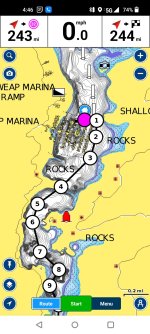
One more thing that is not generally known about Navionics. The automatic routes feature is only accurate at 3606. Basically it's useless. It doesn't adjust when you change surface elevation.
Always, ALWAYS map the route manually. Only takes a few minutes. Or, make an auto route and then manually adjust it. Easy, peasy.
 
One more thing that is not generally known about Navionics. The automatic routes feature is only accurate at 3606. Basically it's useless. It doesn't adjust when you change surface elevation.
Always, ALWAYS map the route manually. Only takes a few minutes. Or, make an auto route and then manually adjust it. Easy, peasy.
Thanks for the info! Where can I learn to manually enter a route or to manually adjust an auto route?
 
Easy. Just click on "Routes at the bottom, then click "automatic". Then press and hold where you want to start, press and hold where you want to end up. It will make a route automatically but because the water level is so low, it will route you over dry land at times. You can manually adjust the line at any point just by pressing and moving the route line.
I hope that makes sense.
 

Attachments

  • Screenshot_2023-04-26-16-47-45-87_81b20ae963eacae32896573612cec06a.jpg
    Screenshot_2023-04-26-16-47-45-87_81b20ae963eacae32896573612cec06a.jpg
    338.8 KB · Views: 14
  • Screenshot_2023-04-26-16-46-42-62_81b20ae963eacae32896573612cec06a.jpg
    Screenshot_2023-04-26-16-46-42-62_81b20ae963eacae32896573612cec06a.jpg
    301.8 KB · Views: 13
Easy. Just click on "Routes at the bottom, then click "automatic". Then press and hold where you want to start, press and hold where you want to end up. It will make a route automatically but because the water level is so low, it will route you over dry land at times. You can manually adjust the line at any point just by pressing and moving the route line.
I hope that makes sense.
Thank you!
 
Status
Not open for further replies.
Back
Top